
With the rise of remote work across various industries, relocating from your home now often means also moving your workspace for many professionals. Moving a home office presents its own unique challenges, namely protecting expensive and sensitive equipment while ensuring work and productivity don’t come to a halt.
This guide provides a clear, step-by-step strategy to strategically plan for the move and securely pack and protect office items, all while minimizing professional downtime.
Proper planning is crucial to successfully moving with a home office while protecting your equipment and maintaining productivity. Getting this stage done right can help eliminate surprises and lets you create a clear, actionable plan that reduces stress.
Packing a workspace takes more than just tossing equipment into boxes. Following a few best practices for moving a home office will help safeguard your equipment and productivity at every stage. Proper packing is crucial to ensuring a smooth transition, and here’s how you do it:
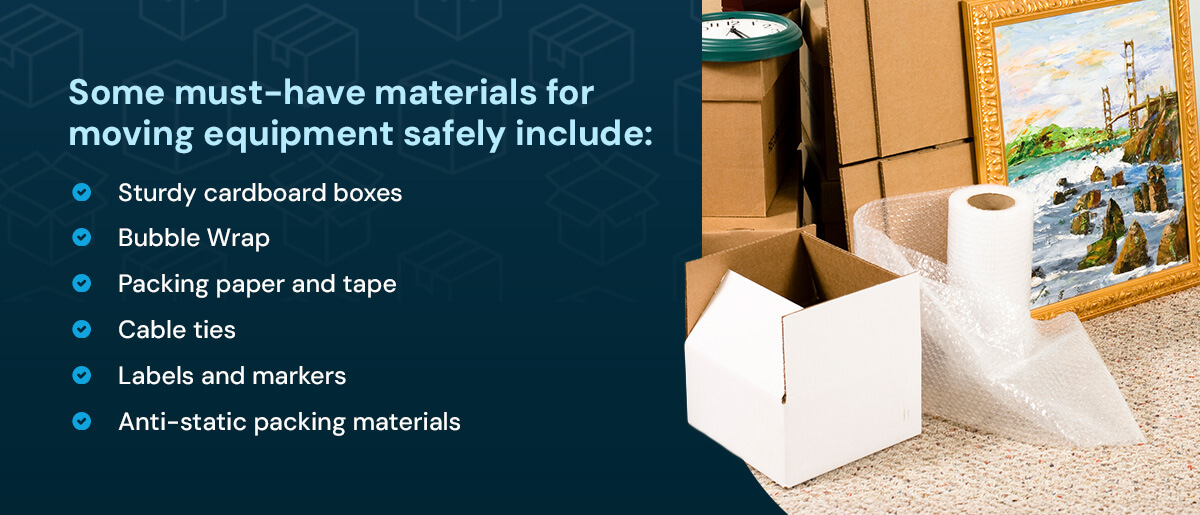
Start by assembling the materials you’ll need for a safe, organized move. Make sure you use high-quality packing materials to protect your equipment during transit. Some of the must-have materials for moving equipment and electronics safely include:
Whenever possible, use the original packaging for computers, monitors and other devices. If you’re working with a professional moving company, confirm which services are included in your package. For example, all residential moves booked with Corrigan Moving Systems include furniture wrapping and free used boxes.
To minimize downtime, set aside a clearly labeled “essentials” box. Include the items you’ll need to get back to work immediately in your new home, such as your laptop, chargers, a working mouse, cables, crucial files or documents and any must-have office supplies. Make sure the box is labeled clearly and readily accessible.
Damaged equipment is the last problem you want to deal with during this exciting transition in your life. Strategic packing, coupled with high-quality materials, can make all the difference. Wrap monitors, computers and other delicate equipment in ample Bubble Wrap and secure them in cushioned boxes. Protect screens with coverings, and stuff empty spaces with packing paper or foam sheets to prevent shifting during transit. Remember to use cable ties to neatly bundle cords and to avoid tangling.
Choosing a moving package that includes professional packing services is the best way to ensure your belongings are as secure as possible.
Whenever possible, disassemble bulky equipment and furniture like desks, office chairs and shelving. It’s best to look at the manufacturer’s instructions or guides online to disassemble each item correctly. Start by removing and packing detachable parts, such as chair wheels and monitor stands, separately. Put screws and small parts in clearly labeled bags, and tape them to the matching item. Taking this extra step ensures easier transport and reduces the risk of loss or damage.
As you pack, clearly label every box with its contents and the intended room. For example, you can label a box “Home Office – Monitors” or “Home Office – Files.” Consider using color-coded stickers or tape for different equipment categories to easily identify them. Make sure delicate items are marked as fragile. Well-marked boxes make unloading smoother and help you, or movers, prioritize what to set up first in your new space.
Moving with a home office doesn’t have to mean putting your work on hold. With careful planning and a few strategic approaches, you can maintain productivity while your space is in transition. Here’s how to move a home office while staying on top of work:
Relocating your workspace is the perfect opportunity to create a setup that’s even more comfortable and productive than before. Once your equipment has been safely relocated, follow these tips for moving a home office into your new space:
You can personalize your new workspace to suit your needs and space. An optimized setup is one of the best practices for moving a home office and sets the stage for a smooth, productive transition.
Moving a home office requires care, expertise and attention to every detail — and that’s precisely what Corrigan Moving Systems delivers. With over 95 years of award-winning experience, we can help take the stress out of your residential move. Our team expertly handles your sensitive office equipment, valuable electronics and cherished workspace items with the highest level of care. We can also help you settle into your home with ease with our unpacking services.
Let us protect your productivity and peace of mind every step of the way. Contact Corrigan Moving Systems today to schedule your free in-home or virtual consultation and discover how hassle-free moving with a home office can be.